Play Sea Battle Online Free With a Friend | Playgridia
The shortest way to play sea battle online is this: open your browser, start a table and send the link to a friend. Naval Battle on Playgridia needs no download, no install and no account; two fleets face off on a 10×8 sea of fog, and whoever sinks the opponent's four ships first wins. Below: how a match is set up, which settings you can change, and what happens if your connection drops.
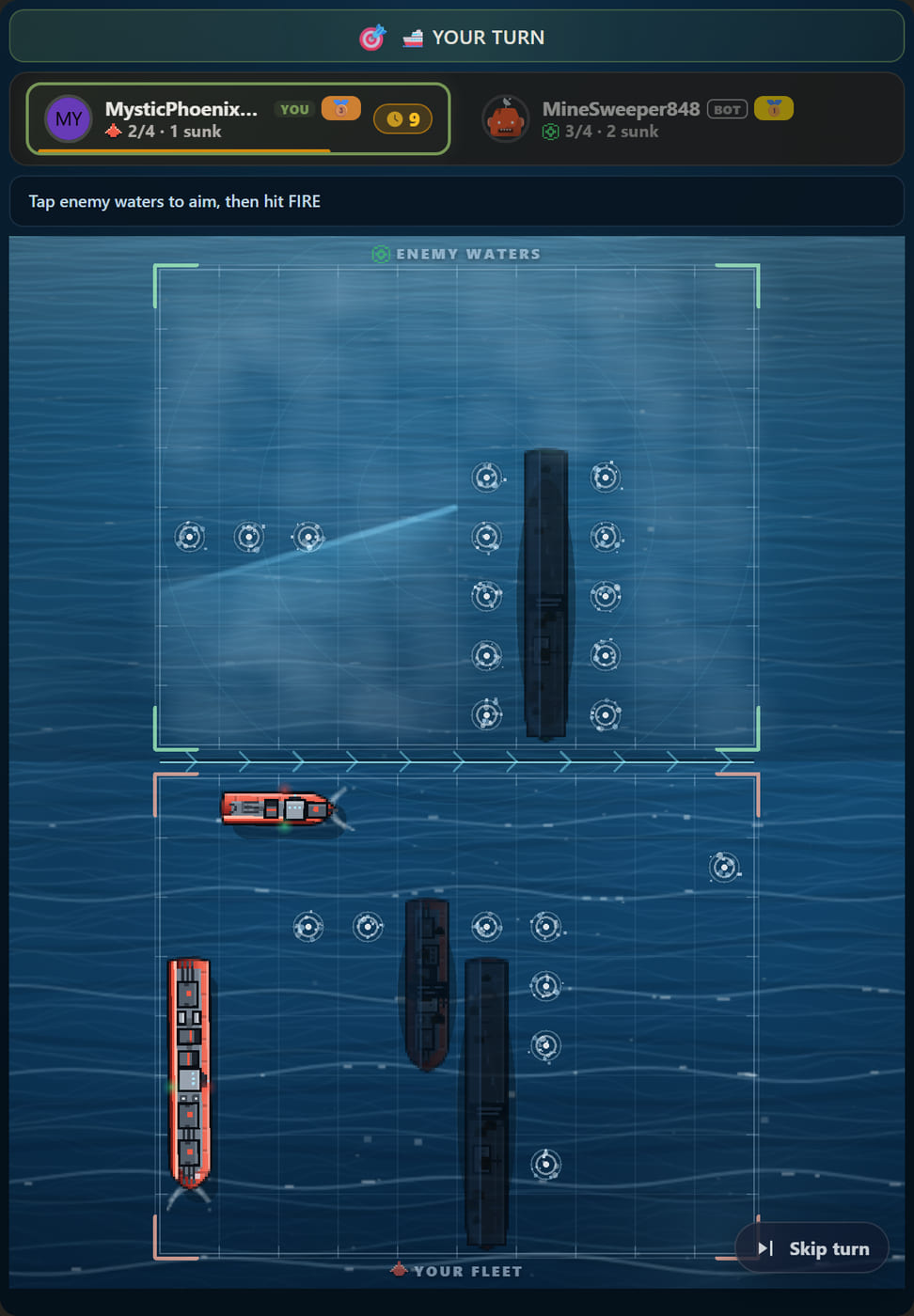
In the browser, no sign-up, in about two minutes
Naval Battle runs in the browser: the same game on a phone, a tablet or a desktop. Nothing to install, nothing to download, and you do not need an account to play — a guest session behaves like a full account, collects coins and streaks, and can be linked to Google later. There is nothing to unlock in Naval Battle: it ships one map, Open Sea, and everybody has it.
Playing with a friend: open a table, send the link
- Start a table from the game page. Naval Battle is a two-player game, so there is no seat count to set.
- Use the share button to copy the room link and send it to your friend.
- They tap the link, take the seat and mark themselves ready; you press Start.
The link works on any device and does not impose the sender's language on the recipient — your friend opens the game in their own browser language. The moment the match starts the server deploys both fleets at random, so nobody waits on a setup screen: the battle begins in seconds.
Or start against a bot right now
If nobody is around you can start a bot match in one tap from the game page, and the three difficulties genuinely behave differently:
- Easy: fires completely at random, uses no checkerboard parity and never uses a signature ability.
- Medium: sweeps around a hit, searches on a checkerboard pattern and spends abilities on confirmed contact.
- Hard: runs the same logic faster; its thinking time is shorter, so the tempo feels tighter.
What you can change in the room
| Setting | Options | Default |
|---|---|---|
| Players | 2 (fixed) | 2 |
| Move clock | 20 · 30 · 40 · 60 · 90 · 300 · 600 seconds | 30 s |
| Board | Open Sea (10×8) — the only map | Open Sea |
| Opponent | A friend by link, or an Easy / Medium / Hard bot | — |
| Spectators | On — a friend can watch your match live | On |
| Rematch | One tap when the match ends | On |
| Undo | Off | — |
There is no unlimited option on any game here; the longest choice is 10 minutes. For a one-tap move 30 seconds is a comfortable tempo, but if you are playing on a phone while chatting, raising it to 60 is sensible.
What happens if your connection drops
This is the moment that ruins most online games, and Naval Battle handles it as a reversible handover:
- If your move clock runs out, only that single turn is played for you by a fog-aware bot. You do not lose the match; the turn comes straight back.
- If you disconnect, the seat stays yours. A bot plays on for a while, and when you return it stands down and the game continues from where it left the board.
- If the server is updated, the match is not lost: reconnect and the board comes back intact, and the downtime is not billed to your move clock.
- If you leave on purpose, a two-player match counts that as a forfeit and your opponent wins. That is the one handover that cannot be undone.
Your opponent cannot see your fleet
This is a server-authoritative game: fleet positions live on the server and are never sent to your opponent's browser. They learn where your ships are only by firing at a square, exactly as you learn where theirs are. There is no way to peek behind the fog by poking at the page; the only information anybody holds is the result of the shots they have taken.
Results are the visible part: every square you fire at is marked, hits leave an ember, and a sunk ship is revealed as a whole wreck, class included. On your own half you always see exactly which cell of which ship was struck.
What a finished match records
Your score is the number of enemy ships you sank, 0 to 4, and that number shows up on the end-of-match scoreboard, in your profile history and in the activity feed. Rating only moves when two humans sit down: matches against a bot never change it — but coins, XP, daily quests and your streak all still count in bot matches, because retention is never tied to rating.
At the end, a rematch is one tap and opens a fresh table with the same settings. If you want to share the result, the match card is redrawn from the game's own poster art; there is no keyboard, you pick a ready-made line, and every reader sees it in their own language.
Three habits that win online matches
For the full rules, see our how to play Naval Battle guide. Online, three things make the difference:
- Sweep a row in four shots. While your battleship is afloat the broadside opens 3 squares even at the edge, so columns 1, 4, 7 and 9 finish a whole row end to end.
- Stop searching on your first hit. Damage is not a debuff — a half-burning ship fires at full strength — so finish the wounded hull before you look anywhere else.
- Spend abilities on evidence. With the orientation unknown, Cross Salvo probes all four neighbours in one turn; hold the Air Strike until two hits appear near each other.
For a deeper plan, our Naval Battle strategy guide covers how to raise the number of squares you open per turn. Ready? Play Naval Battle free and send the link to a friend.
Any third-party brand or game names mentioned are trademarks of their respective owners. Playgridia is an independent platform and is not affiliated with or endorsed by them.
Frequently Asked Questions
How do I play sea battle online with a friend?
Open a table from the game page, copy the room link with the share button and send it to your friend. They tap the link, take the seat, mark ready and you press Start. Neither of you needs to create an account; a guest session is enough.
Is Naval Battle really free?
Yes. It runs in the browser with no download and no install. Naval Battle ships a single map, Open Sea, and everybody has it, so there is no board in this game to buy or unlock.
Do I lose the match if my connection drops?
No. A bot plays for a while, and when you come back you reclaim the seat and the game continues from there. A move-clock timeout is even smaller: only that single turn is played for you. Only deliberately leaving a two-player match counts as a forfeit.
How long does a match take?
The default move clock is 30 seconds and each turn is a single decision, so most matches finish in under ten minutes. In the room you can drop the clock to 20 seconds to speed things up, or raise it as far as 10 minutes.
Can a friend watch my match?
Yes — spectator mode is on, so a friend who opens the room can follow the match live. When it ends, a rematch is one tap. Undo is off: once a shot is confirmed it cannot be taken back.