Free Online Word Games for Kids: Daily Puzzle and Categories
 Play Word Duel
The best word games for kids online are free and teach through feedback rather than lectures: a five-letter guessing game where colours tell a child which letters are right, a once-a-day puzzle that works as a classroom warm-up, and a group game of names, cities and animals. All three run in a browser; guests play the duel and the categories game without an account, while the daily puzzle needs a free one.
Which game for which child
| Game | What a child practises | How to start |
|---|---|---|
| Word Duel (five-letter guessing) | Spelling patterns, using clues, vocabulary in the chosen word language | Press the Play button above: you plus two bots, one tap |
| Word of the Day (solo daily puzzle) | The same skills, one calm puzzle at a time | Open the daily puzzle; sign in with a free account to solve it |
| Categories (Name Place Animal Thing style) | Fast recall by category, spelling, judging answers together | Open Categories, add bots or invite friends |
In the duel and the categories game guests play without an account, so a child never has to type personal details; pick by what a particular child enjoys, and sit alongside younger players the first time.
Word Duel: reading the colour clues
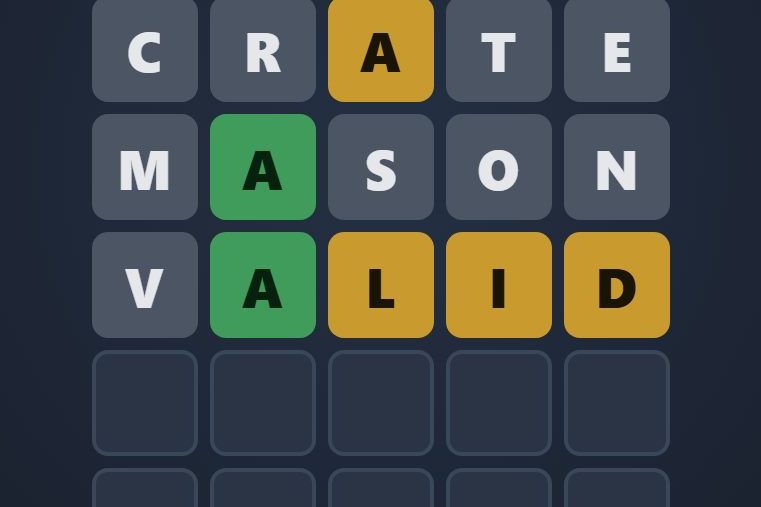
Every player in the match tries to find the same hidden five-letter word, and everyone guesses at the same moment, so nobody waits for a turn. The grid has six rows of five tiles. After each guess every tile changes colour:
- Green: right letter, right place.
- Amber-yellow: the letter is in the word, but somewhere else.
- Grey: the letter is not in the word.
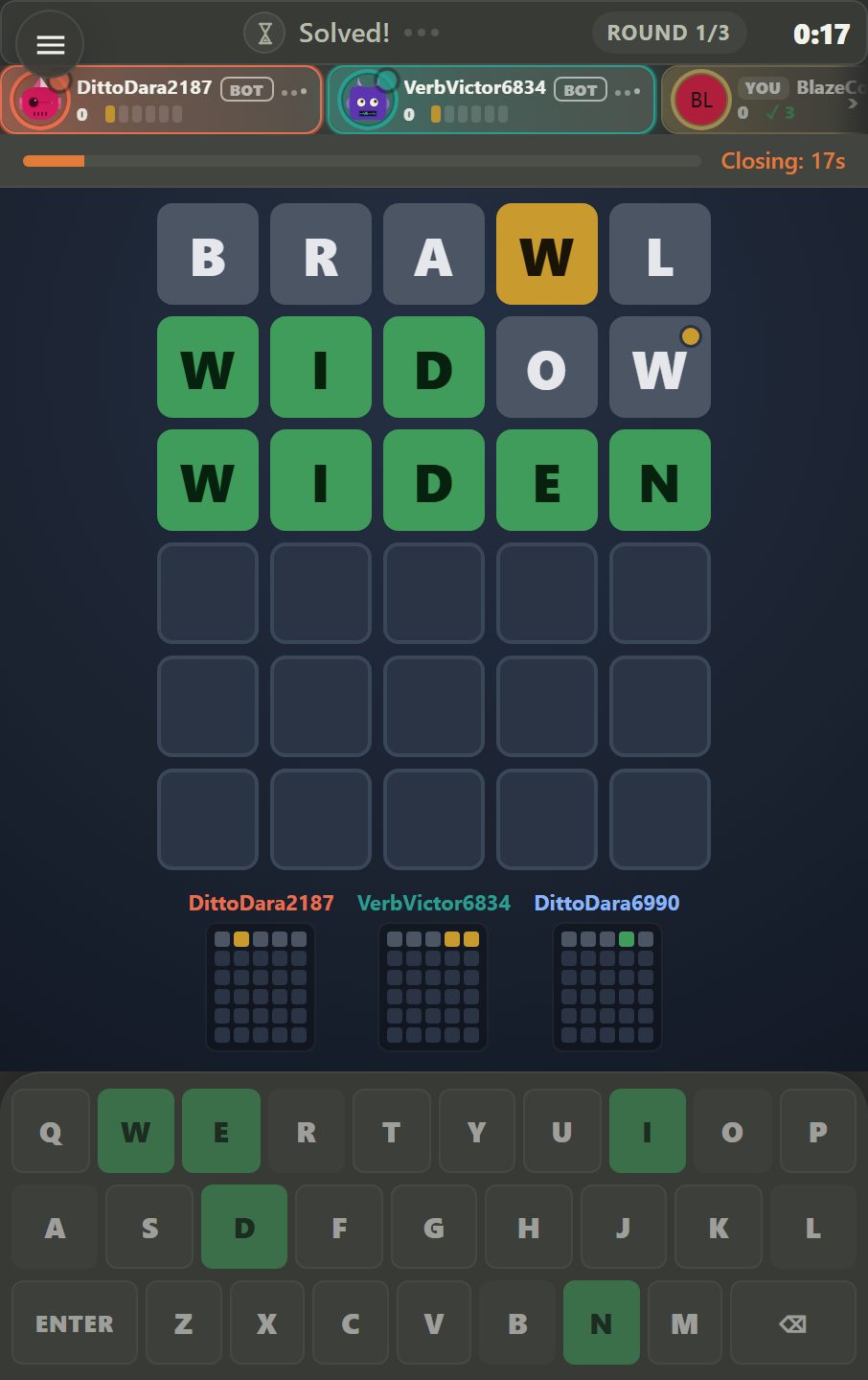
The on-screen keyboard remembers the best clue each letter has earned, so a child can look down instead of keeping the whole history in their head.
Why it is friendly for beginners
- A word that is not on the list costs nothing. The row shakes, a message appears, and no guess is used, so a typo is not a disaster.
- There is no hard mode. A child may guess any word, even one that ignores earlier clues, to test an idea.
- Repeated letters are flagged on screen. If a guess has more copies of a letter than the secret word, the extra one shows grey with a small amber dot in the corner.
- Secret words are common words. The hidden word is drawn from a list of everyday base-form words, not from the longer list of accepted guesses.
For ideas on good first guesses, see the starting-words guide, and for the rules in full, how to play the five-letter word game.
Round timer and match settings
The round clock is the setting a parent or teacher will most want to change. In the match settings of a room the choices are 90, 120, 150 or 180 seconds per round, and the default is 120. A match is 1, 3 or 5 rounds, with 3 as the default. The first quick match a player ever finishes is a single round, so a new child gets a short taste.
Scoring rewards fewer guesses: 60 points for a first-try solve, then 50, 40, 30, 20 and 10 for a sixth-try solve, and nothing if the word is not found. The first three players to solve also get a speed bonus of 15, 10 and 5. Once one player solves, the others get a closing window of at most 20 seconds, so a round never drags.
The word language is chosen separately from the site language, so a child learning English can play an English room while the menus stay in the family language. A room seats 2 to 6 players, and a room opened by a guest seats up to 4. Rooms have chat, and a host can switch a waiting room to link only, so only people holding the link can join.
The daily puzzle as a classroom warm-up
The daily puzzle is a solo run at one shared five-letter word. Everyone who opens it in the same language on the same day gets the same word, and it changes once per UTC day, so check the clock if your school is far from UTC. Each player gets six guesses.
Three details matter for a class:
- The puzzle needs a free account. Anyone can see the page and today’s ranking, but solving it takes a sign-in; in class, the easiest way is to put the teacher’s account on the big screen and solve it together.
- The answer stays hidden until the run is won or lost, so talking about strategy aloud cannot spoil it.
- The share text uses coloured squares only. It shows the puzzle number, the guesses used and one row of squares per guess, never a letter, so pupils can compare results without giving the word away.
When a run ends the screen shows games played, win rate, a streak counter, how many guesses past wins took, and a countdown to the next puzzle. A simple routine: put the puzzle on the board, take one class guess, read the colours together, and let pupils finish it on their own. For the format in general, see the word-of-the-day guide.
Categories: a group word game
This is the paper game Name, Place, Animal, Thing, played online. A letter is drawn and everyone fills in the same five fields at once. The online sheet has Name (a first name), City, Animal, Plant and Object, so there is no country, river or food column. If your paper sheet has those, they are not part of the online version.
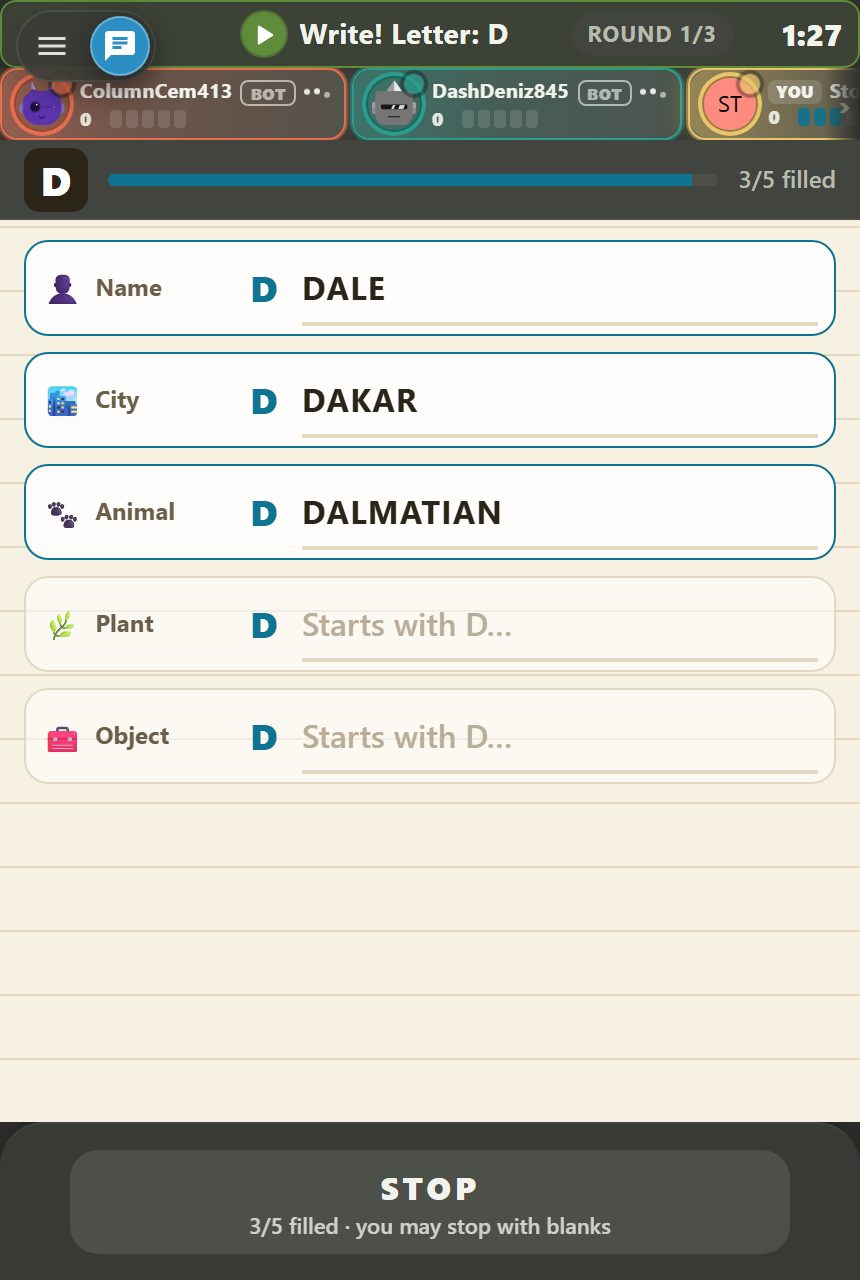
The default is 5 rounds with 60 seconds of writing; you can choose 3, 5 or 8 rounds and 45, 60 or 90 seconds. A first quick match for a new player is 3 rounds. When someone presses STOP the table gets at most 10 more seconds, as on paper.
- An answer nobody else wrote scores 10; the same answer written by others scores 5 each.
- The first player to press STOP gets 5 extra, but only with at least three scoring answers.
- Answers that are not on the list of the game go to a vote of the other players, and a tied vote lets the answer through.
Capitals, spaces and accents are ignored in English, but a different spelling is a different word. The vote is the part teachers tend to like, because children have to argue whether an answer is reasonable. More ideas are in Name Place Animal Thing for kids, and you can print a sheet from the sheet and categories guide.
Setting it up safely
Quick play with bots is the calmest start: one tap and the child is playing against two bots. To play with a class or family, create a room, switch it to link only, then share the link. Rooms have chat, so decide who may join before you send it. Bots can fill any empty seat. For head-to-head play, the two-player word game guide explains how.
What to do with this
Start with one round of Word Duel next to the child and read each colour aloud. Move to the daily puzzle as a five-minute routine, and bring in Categories when three or more people like talking while they write. If rounds feel rushed, raise the round clock before anything else: more time keeps it fun.
Frequently Asked Questions
Are there free word games for kids that need no sign-up?
Yes. Guests can play Word Duel without registering: the Play button starts a match with two bots. The daily puzzle is the exception: anyone can see the page, but solving it needs a free account.
How does a child read the colour clues in the five-letter game?
Green means the letter is right and in the right place. Amber-yellow means the letter is in the word but somewhere else, and grey means it is not in the word. The on-screen keyboard keeps the best clue each letter has earned.
How long are the rounds, and can I change them?
The round clock is 90, 120, 150 or 180 seconds, and the default is 120. A match is 1, 3 or 5 rounds, with 3 as the default. A first-ever quick match is a single round.
Can a teacher use the daily puzzle with a class?
Yes. Everyone who plays in the same language on the same UTC day gets the same word, with six guesses each. The answer stays hidden until a run ends, and the share text contains only coloured squares, never letters.
What is the categories game, and how does it differ from the paper version?
It is the Name, Place, Animal, Thing game: a letter is drawn and everyone fills five fields at once. The online sheet has Name, City, Animal, Plant and Object, so there is no country, river or food column. Unique answers score 10, shared ones 5, and the first STOP gives 5 more with three scoring answers.